
Release Notes: Visit 5.55
Release 5.55 focuses primarily on bug fixes and maintenance improvements to ensure a stable and reliable platform experience, along with preparatory back-end work for the upcoming Visit Shop overhaul.
In addition, a functional enhancement has been introduced, which enables organisers to have control over shared system questions, and a new ‘Search’ button has been added to the Rules section.
Visit Create
Visit Connect – Control over Shared System Questions
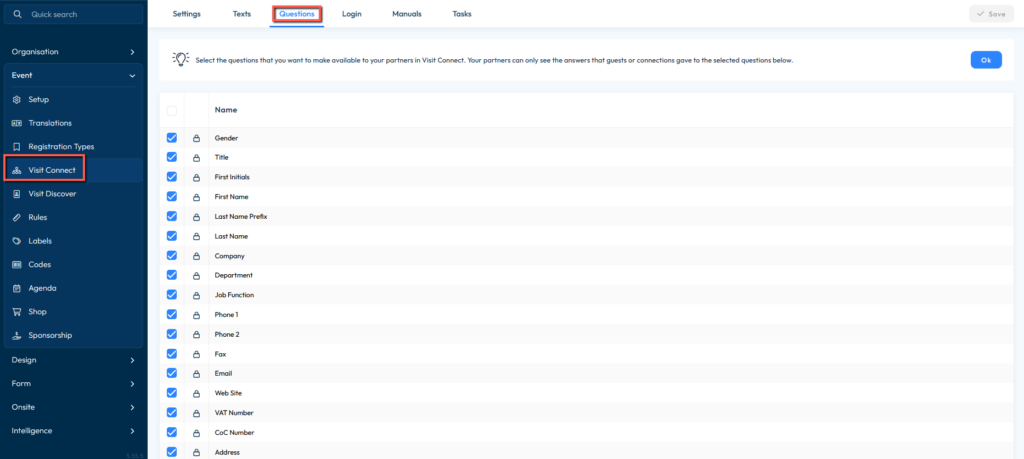
Under Event → Visit Connect → Questions, organizers could already configure which custom questions are shared when a connection is created by scanning a visitor badge.
What’s New
This functionality has been extended to also include system questions. Organizers can now control which standard visitor fields are shared with exhibitors when a badge is scanned and a connection is created.
The following system fields can now be selected or deselected:
| System Field | System Field |
|---|---|
| Gender | Fax |
| Title | |
| First Initials | Web Site |
| First Name | VAT Number |
| Last Name Prefix | CoC Number |
| Last Name | Address |
| Company | House Number |
| Department | Postal Code |
| Job Function | City |
| Phone 1 | State |
| Phone 2 | Country |
Important Notes
- For both new and existing events, all system fields are enabled by default, so the current sharing behaviour remains unchanged.
- Organizers can deselect any fields they do not wish to share with exhibitors.
- Deselected fields are available for completion by Visit Connect users, so they always exist as columns in the export.
- When an event is cloned, the selected system question settings are automatically copied to the new event.
Improvements
This release includes a number of behind-the-scenes bug fixes and maintenance aimed at improving overall platform stability and performance. These changes do not affect your day-to-day workflows.
Release Notes: Visit 5.54
Visit Create
This release delivers bug fixes and performance improvements to enhance system reliability.